
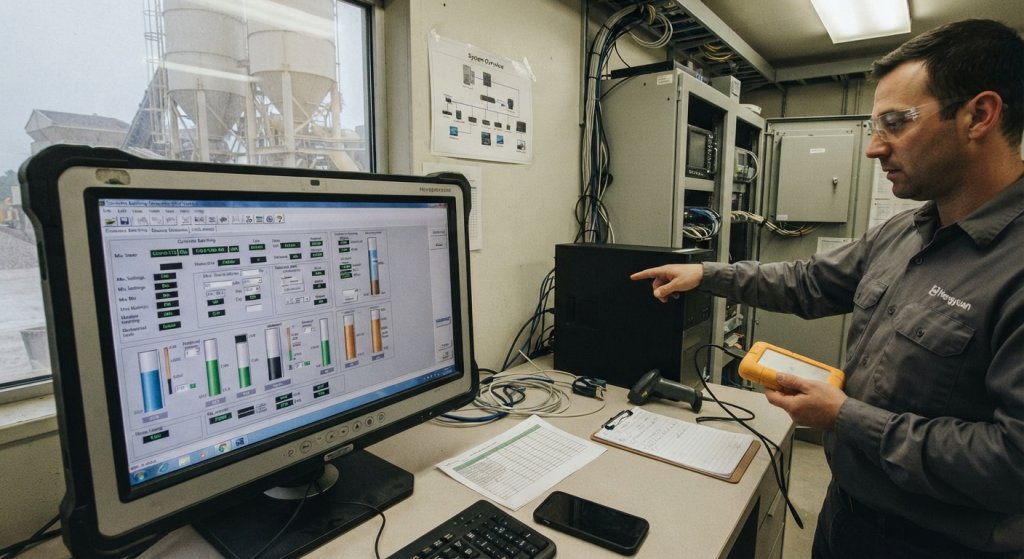
Industry analysis: Batch plant control backups are a practical part of equipment readiness, not merely an office IT task. A batching plant may retain mix settings, calibration references, material assignments, batch histories and operator permissions across several connected devices. If a controller or workstation must be replaced, a copy of one folder may not be enough to recover the working arrangement. This seven-check guide helps plant teams define what to preserve, who owns the process and how to test a recovery without interrupting production. It is a planning framework, not a claim about a particular Hengyuan installation or a substitute for the control supplier’s instructions.
1. Map the control system and its records
Start by listing the components that hold settings or produce records. Depending on the plant, this may include a batching computer, controller, operator interface, scale indicators, moisture measurement equipment, admixture dosing controls and a reporting workstation. The list should distinguish configuration files from historical batch data. A team may need both, but they serve different purposes: one helps re-establish operation, while the other supports traceability and review.
Ask the equipment provider which files can be exported, which require a proprietary tool and which settings must be recorded separately. Note the device name, location, software version and the person who can authorize an export. Batch plant control backups become easier to maintain when the inventory reflects the actual plant, rather than a generic diagram left from commissioning. Do not assume that a recent batch report contains the settings needed to configure a replacement controller.
2. Connect backups to approved changes
A backup schedule should follow the rate of change as well as the calendar. A plant that adjusts a mix library, replaces a scale indicator or changes a network address needs a clear point at which the approved configuration is captured. Record what changed, who approved it and which backup represents the last known working state. Keep a previous known-good copy until the new configuration has been checked; a recently saved file is not automatically the correct one.
The U.S. National Institute of Standards and Technology’s operational-technology backup guidance emphasizes integrating backups into change management, making copies regularly and testing them. For a concrete plant, that translates into a simple rule: a significant control change is not closed until its recovery information has been updated. Batch plant control backups should therefore appear in the same handoff as the maintenance or calibration work that prompted the change.
3. Choose copies and storage locations
A copy stored only on the batching computer is vulnerable to the same device failure as the original. Decide which copies remain on site for convenient recovery and which are kept separately under the company’s access and retention policy. The right arrangement depends on the plant’s connectivity, supplier support model and recovery needs. Storage choices should be reviewed by the people responsible for both plant operations and information security; a removable drive that nobody can locate is not a useful recovery plan.
Label backup sets with a date, system identifier and approved configuration reference. Protect them against casual changes, loss and unauthorized access. If records contain customer or production information, apply the organization’s confidentiality rules. Do not connect unverified media to a running control network simply to check whether a file exists. Batch plant control backups are valuable only when the correct copy can be found and handled safely when needed.
4. Test a controlled restoration
A successful export message proves that a file was created; it does not prove that the file can restore the intended function. Arrange a controlled test with the control supplier or authorized technical staff, preferably on a spare or isolated system when the live plant cannot be interrupted. Confirm that the file opens, that its version is recognizable and that the expected configuration items are present. Define in advance what constitutes a pass and who signs off the result.
A hypothetical example illustrates the risk. A plant may have an archived mix library and a separate controller program, while only the library is copied during a routine backup. The archive appears complete until a workstation replacement is attempted. This is a hypothetical planning case, not a Hengyuan customer incident. A restoration exercise should expose that gap before a failure, without experimenting on live production. If a test fails, record the reason, the corrective action and the next test date.
5. Keep software and hardware context
Recovery may depend on more than a data file. Record the control software release, controller model, communication settings, license requirements and supplier contact details that an authorized technician would need. Store installation media and access information according to the company’s security policy; this article does not recommend placing passwords inside the backup archive. If a replacement component differs from the original, the supplier should confirm compatibility before a restoration is attempted.
Keep a concise configuration map alongside batch plant control backups: which workstation talks to which controller, where batch tickets are generated and how scale or moisture inputs enter the system. This is especially useful after a hardware replacement, when a correct program can still produce wrong results if input assignments differ. The map should be updated after verified changes rather than reconstructed from memory during an outage.
6. Plan the wider restart sequence
A restored control screen is not proof that the plant is ready to batch. Before production resumes, the authorized team should verify physical inputs, material routing, weighing and dosing checks, alarm behavior and the current approved mix information under the site’s normal procedures. The recovery plan should identify what can be checked offline, what requires the equipment supplier and what must wait for a controlled plant test. Do not bypass quality or safety checks to shorten an outage.
Separate data recovery from power and mechanical restart planning. Hengyuan’s batching plant backup power and restart guide discusses broader continuity questions; this article focuses on preserving and recovering control information. The two plans should meet at a clear handoff: after the files and settings are restored, the operating team confirms the real plant state before accepting production. Batch plant control backups support that decision but cannot make it alone.
7. Assign ownership and review dates
Name an owner for creating copies, another person who can verify that they are accessible and an authorized role for restoration. The same person may hold more than one role in a small plant, but the responsibility should be explicit. A short record should show the most recent backup date, the system covered, the last restore test, the storage location reference and any unresolved exception. Review it after changes to equipment, software, personnel or storage arrangements.
Make the process practical for shift handover. An operator who notices a failed backup should know whom to notify and whether a recent verified copy exists; they should not be expected to troubleshoot the controller alone. A manager should be able to answer three questions quickly: what is the latest known-good copy, how was it tested, and who can restore it? If those answers are unclear, the backup process needs attention before the next control change.
Planning takeaway
Batch plant control backups work best as a maintained recovery capability: define the assets, capture approved changes, protect copies and prove that a controlled restoration is possible. The seven checks provide a conversation for plant managers, quality personnel and control suppliers, not a universal technical recipe. Hengyuan recommends adapting the checklist to the actual equipment, the supplier’s documentation and the site’s own security and quality procedures. The goal is not just to save files; it is to make a future restart more understandable and verifiable.
Contact Us: +86 199 3949 4756